
WAEC Recruitment Portal: Check Your Application Status for the Next Stage
The West African Examinations Council (WAEC) has started updating the application status of candidates who applied for its 2026 recruitment exercise.
Applicants who submitted their applications are encouraged to log in to the recruitment portal to check whether they have been moved to the next stage of the selection process.
Those who applied should also keep an eye on the email address used during registration, as WAEC is expected to communicate further instructions to successful candidates.
WAEC Begins Updating Application Status
The WAEC recruitment exercise, which opened in May 2026 and closed in July 2026, attracted thousands of applications from qualified Nigerians seeking employment with the examination body.
With the application phase now concluded, WAEC has started updating applicants’ dashboards, notifying successful candidates that they have progressed to the next stage.
What the WAEC Status Update Says
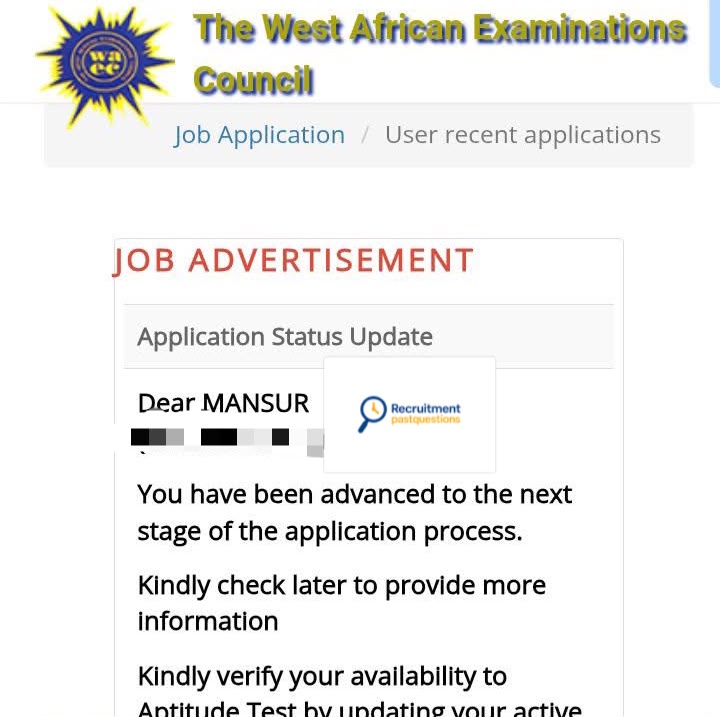
Applicants who have been moved to the next stage are seeing the following message on their dashboard:
“You have been advanced to the next stage of the application process. Kindly check later to provide more information. Kindly verify your availability to Aptitude Test by updating your active Email Address, Phone Number, and State of Residence. Please ensure that the information provided is accurate, as it will be used for subsequent communication regarding your application.”
If this message appears on your dashboard, it means your application has successfully passed the initial screening stage.
What You Should Do Next
Applicants who have received the notification should take a few minutes to review the information on their recruitment profile.
Ensure that:
- Your email address is correct and active.
- Your phone number is up to date.
- Your state of residence is correctly entered.
WAEC has stated that these details will be used to contact candidates regarding the aptitude test and other stages of the recruitment exercise.
It is also advisable to check your recruitment dashboard regularly, as more information will be made available there.
How to Check Your WAEC Recruitment Status
If you applied for the recruitment exercise, you can check your application status by following these steps:
- Visit the official WAEC recruitment portal.
- Log in with the email address and password you used during registration.
- Open your application dashboard.
- Check whether your application status has been updated.
- If requested, update your contact details and save the changes.
Applicants should also check their email inbox, including the spam or junk folder, for any message from WAEC.
WAEC Recruitment Portal Link
You can check your application status through the official WAEC recruitment portal below:
https://recruitment.waec.com.ng
Always use the official WAEC portal to check your status or update your information. Be cautious of unofficial websites or individuals claiming they can help applicants secure employment.
If Your Status Has Not Changed
If you have not received any update yet, there is no need to panic.
WAEC may release updates in batches, so not every applicant will receive a notification at the same time.
Continue checking your dashboard and email regularly, as more candidates may be notified in the coming days.
Also, avoid relying on screenshots or messages shared on social media. The most reliable way to know your application status is by logging into your own WAEC recruitment dashboard.
???? Stay Empowered with ZOEEB
Join our community for daily updates on jobs, skills, and financial growth opportunities.