
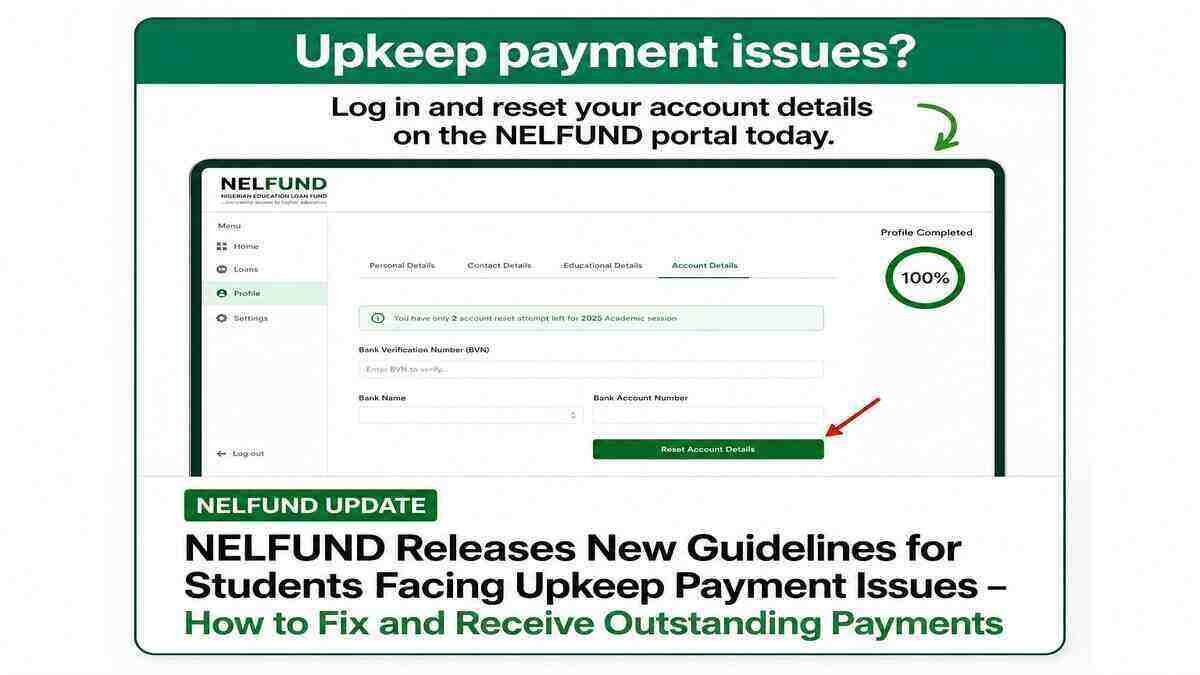
The Nigerian Education Loan Fund (NELFUND) has provided fresh guidance for student loan beneficiaries experiencing problems with their monthly upkeep payments.
The agency announced that students who have not been receiving their approved upkeep allowance due to account-related issues can now update their bank details through the Student Loan Portal.
The update is expected to help affected students resolve payment challenges and ensure the smooth processing of their monthly upkeep allowances.
NELFUND Issues Important Notice to Affected Students
In a recent update shared on its official X (formerly Twitter) account, NELFUND advised applicants who have experienced upkeep payment issues to log in to the Student Loan Portal and update their account information.
According to the agency:
“All applicants who previously experienced issues with their upkeep payments are advised to log in and update their account details to ensure smooth processing.”
This directive is specifically targeted at students who may have entered incorrect bank details during their application process.
Who Needs to Update Their Bank Details?
NELFUND clarified that not every beneficiary needs to make changes to their account information.
You Should Update Your Account Details If:
- You entered the wrong bank account number during registration
- The bank account submitted does not exist
- You have not been receiving your approved upkeep payments
- Your account details contain errors that may prevent successful payment
You Do Not Need to Update Your Details If:
- You have been receiving your monthly upkeep without issues
- Your submitted bank account information is correct
- Your payments are being processed normally
Students who are already receiving their upkeep allowance are advised to ignore the update.
Will Changing My Bank Account Affect My Approved Loan?
One of the concerns raised by students was whether changing bank details would affect already approved upkeep payments.
NELFUND explained that beneficiaries can update their account information and have future payments redirected to the new account.
The agency noted that approved upkeep loans remain valid even after updating account details.
However, students whose current bank accounts are working properly do not need to make any changes.
What to Do If You See “API Limit Exceeded” Error
Following the announcement, many students reported receiving an “API Limit Exceeded” error message while attempting to update their details.
According to information provided by NELFUND, this issue is likely caused by the large number of students accessing the portal at the same time.
If you encounter this error, try the following:
- Clear your browser cache
- Refresh the page
- Log out and log back in
- Use another browser
- Wait a few minutes and try again later
Because many beneficiaries are currently trying to update their information, temporary delays may occur.
I Corrected My Bank Details. Will My Outstanding Upkeep Be Paid?
NELFUND has indicated that students whose upkeep status already shows “Approved” may still receive outstanding payments after correcting their bank information.
This means that beneficiaries who missed previous upkeep disbursements due to account errors may still be eligible to receive their unpaid allowances.
However, updating your bank details alone may not be enough.
Create a Support Ticket for Faster Resolution
Students who have corrected their account information are advised to open a support ticket through NELFUND’s support channels.
Creating a support ticket helps notify the agency about your case and allows officials to investigate any outstanding payment issues.
This is particularly important for students who have accumulated several months of unpaid upkeep due to incorrect account details.
What If the Portal Is Not Working?
Some students have reported difficulties accessing the update feature after logging in.
If you experience this problem, NELFUND recommends:
- Clearing your browser cache
- Trying another browser
- Using a different device
- Waiting and trying again later
The agency noted that high traffic on the portal may temporarily affect performance.
With thousands of students attempting to update their information simultaneously, occasional delays are expected.
Steps to Update Your NELFUND Bank Details
If you are affected by upkeep payment issues, follow these steps:
Step 1
Log in to your NELFUND Student Loan Portal account.
Step 2
Navigate to the account details or profile section.
Step 3
Update your correct bank account information.
Step 4
Review the information carefully before submitting.
Step 5
Save the changes and confirm that the update was successful.
Step 6
Create a support ticket if you have outstanding unpaid upkeep allowances.
Important Advice for Beneficiaries
Before updating your details, ensure:
- Your bank account number is correct
- The account is active
- The account name matches your NELFUND records
- You are using the correct bank
Entering inaccurate information again may result in further payment delays.
Final Thoughts
The latest update from NELFUND offers a solution for students who have been unable to receive their monthly upkeep due to incorrect bank details.
Affected beneficiaries are encouraged to update their account information as soon as possible, especially if their upkeep status already shows “Approved.”
Students who continue to experience issues after updating their details should create a support ticket and follow up through official NELFUND support channels.
Read Also ;
NELFUND Management Gives Fresh Update on Suspension of Student Upkeep Allowance Payments
How to Change Institution on NELFUND Portal 2026 (Full Guide, Requirements, Issues & Support Process)
???? Stay Empowered with ZOEEB
Join our community for daily updates on jobs, skills, and financial growth opportunities.