
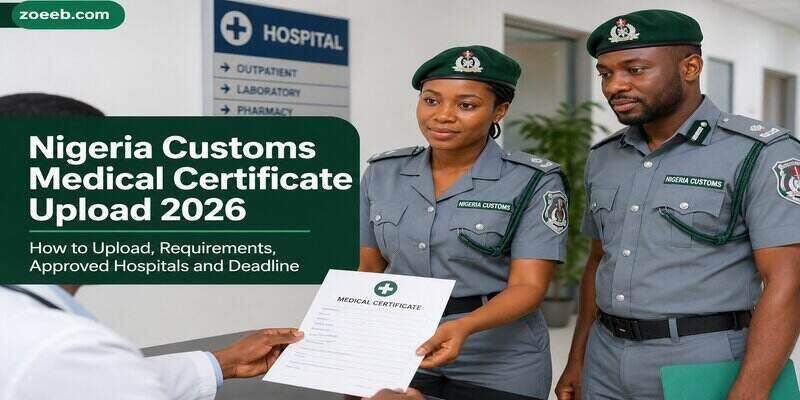
The Nigeria Customs Service (NCS) has moved its 2024/2025 recruitment exercise to another important stage after releasing the final list of successful candidates for the rank of Assistant Superintendent of Customs II (ASC II).
Candidates whose names appear on the final list have been directed to upload a Medical Certificate of Fitness before proceeding to documentation and physical screening.
The upload portal will open on Wednesday, 29 July 2026, and successful applicants have one week to complete the exercise. The Service also instructed candidates to update their current state of residence and accept their provisional offer of appointment through the designated portal.
If you have been shortlisted, this guide explains everything you need to know, including who should upload the certificate, the documents required, the official portal, accepted hospitals, common mistakes to avoid and what happens after the upload.
Who Should Upload the Nigeria Customs Medical Certificate?
The medical certificate upload is not for every applicant who participated in the recruitment exercise.
It is only meant for candidates who:
- Appeared on the Nigeria Customs Recruitment Final List. Check Final List HERE
- Were offered provisional appointment into the rank of Assistant Superintendent of Customs II (ASC II).
- Have been instructed by the Nigeria Customs Service to proceed with the next stage of the recruitment process.
Applicants whose names did not appear on the final list are not expected to complete the upload at this stage.
Nigeria Customs Medical Certificate Upload Date
The Nigeria Customs Service has announced the following schedule:
| Activity | Date |
|---|---|
| Medical certificate upload portal opens | Wednesday, 29 July 2026 |
| Upload deadline | One week after portal activation |
| Documentation exercise | To be announced |
| Physical screening | To be announced |
Candidates are advised not to wait until the final day before completing the upload, as delays or technical issues could affect submission.
Official Nigeria Customs Medical Certificate Upload Portal
Successful candidates should complete the exercise through the official Nigeria Customs update portal:
To access the portal, candidates can sign in using either:
- Their National Identification Number (NIN), or
- The email address used during the recruitment application.
The Nigeria Customs Service has warned candidates to use only its official platforms and ignore unofficial websites or individuals claiming they can process the upload on their behalf.
Documents You Should Prepare Before Uploading
Before logging into the portal, make sure you have the necessary documents ready.
1. Medical Certificate of Fitness
This is the main document required for this stage.
The certificate must be issued by a recognised government hospital and should clearly state that you are medically fit for service.
2. National Identification Number (NIN)
Your NIN will be used to verify your identity and may also be used to log into the portal.
Ensure the details on your NIN match the information submitted during your recruitment application.
3. Registered Email Address
Candidates can also log in with the email address used when applying for the recruitment exercise.
Ensure you still have access to the email account.
4. Active Phone Number
Keep your registered phone number active because future updates may be sent through SMS.
5. Stable Internet Connection
Since the process is completed online, use a reliable internet connection to avoid interruptions while uploading your document.
Which Hospitals Are Accepted?
The Nigeria Customs Service has stated that the Medical Certificate of Fitness must come from a government-recognised hospital.
In practical terms, candidates should obtain the certificate from reputable public healthcare facilities such as:
- Federal Medical Centres (FMCs)
- Federal Teaching Hospitals
- State Government Hospitals
- General Hospitals
- University Teaching Hospitals
- Other government-owned hospitals recognised by relevant health authorities
To avoid problems during verification, candidates should stay away from unregistered clinics or facilities that cannot issue officially recognised medical reports.
If you are unsure where to obtain the certificate, visiting a Federal or State Government hospital is usually the safest option.
What Should the Medical Certificate Contain?
Although the Nigeria Customs Service has not released a detailed template, candidates should ensure the certificate contains essential identification details, including:
- Your full name.
- Date of medical examination.
- A clear statement confirming you are medically fit.
- Name of the examining doctor.
- Doctor’s signature.
- Official hospital stamp.
- Hospital name and address.
- Date the certificate was issued.
Before leaving the hospital, check that every detail is correct and matches your recruitment records.
Step-by-Step Guide to Upload Your Medical Certificate
Uploading the certificate is straightforward if you follow the correct procedure.
Step 1: Visit the Official Portal
Open your browser and visit:
https://update.customs.gov.ng
Step 2: Log Into Your Account
Use either:
- Your National Identification Number (NIN), or
- Your registered email address.
Step 3: Open Your Candidate Dashboard
After logging in successfully, access your recruitment profile.
Step 4: Locate the Medical Certificate Upload Section
Select the option for uploading your Medical Certificate of Fitness.
Step 5: Upload the Certificate
Choose the correct file from your device and upload it.
Before submitting, confirm that the document is clear and readable.
Step 6: Update Your Current State of Residence
The Nigeria Customs Service has also instructed successful candidates to update their present state of residence on the portal where required.
Step 7: Accept Your Provisional Appointment
Click the “Accept Offer” button to confirm that you accept the provisional appointment offered by the Service.
Step 8: Review Your Details
Take a few minutes to check every detail before submitting.
Correcting mistakes after submission may not be possible.
Step 9: Submit and Save Confirmation
Once everything is correct, submit your information and keep a copy or screenshot of the confirmation page for your records.
What Happens After the Upload?
Uploading the medical certificate does not complete the recruitment process.
Candidates who successfully finish this stage should expect the following:
- Issuance of a Trainee Identification Number (TIN).
- Announcement of documentation dates.
- Invitation for physical screening.
- Further instructions through the official recruitment portal, email or SMS.
Applicants are encouraged to monitor their email inbox and phone regularly so they do not miss important updates.
Common Mistakes That Could Affect Your Recruitment
Many candidates lose opportunities because of simple errors.
Avoid the following:
- Waiting until the deadline before uploading.
- Using a medical certificate issued by an unrecognised facility.
- Uploading a blurred or incomplete document.
- Entering incorrect personal information.
- Ignoring official emails or SMS from the Nigeria Customs Service.
- Using unofficial websites instead of the approved portal.
- Failing to click the “Accept Offer” button after uploading.
Taking time to review your information can help prevent unnecessary problems.
Important Things to Do Before Uploading
To make the process easier:
- Obtain your medical certificate early.
- Scan the certificate clearly before uploading.
- Ensure your internet connection is stable.
- Check that your NIN and email details are correct.
- Complete the upload well before the deadline.
- Save copies of every document submitted.
Frequently Asked Questions
Is the Nigeria Customs medical certificate upload compulsory?
Yes. Successful candidates on the final recruitment list are required to upload a valid Medical Certificate of Fitness before moving to the next stage.
When will the upload portal open?
The portal will open on Wednesday, 29 July 2026.
Which portal should I use?
Candidates should use the official Nigeria Customs update portal:
https://update.customs.gov.ng
Can I obtain the medical certificate from any hospital?
The Nigeria Customs Service requires the certificate to be issued by a government-recognised hospital.
What happens after I upload my certificate?
Successful candidates will await further instructions on documentation, physical screening and the issuance of their Trainee Identification Number (TIN).
Can I miss the deadline?
Candidates are expected to complete the upload within one week after the portal becomes active. Failure to meet the deadline could affect the provisional offer of appointment.
???? Stay Empowered with ZOEEB
Join our community for daily updates on jobs, skills, and financial growth opportunities.