

If you have paid for a CAC application but are not sure whether the payment went through, you can check the payment status from your application on the Corporate Affairs Commission (CAC) portal.
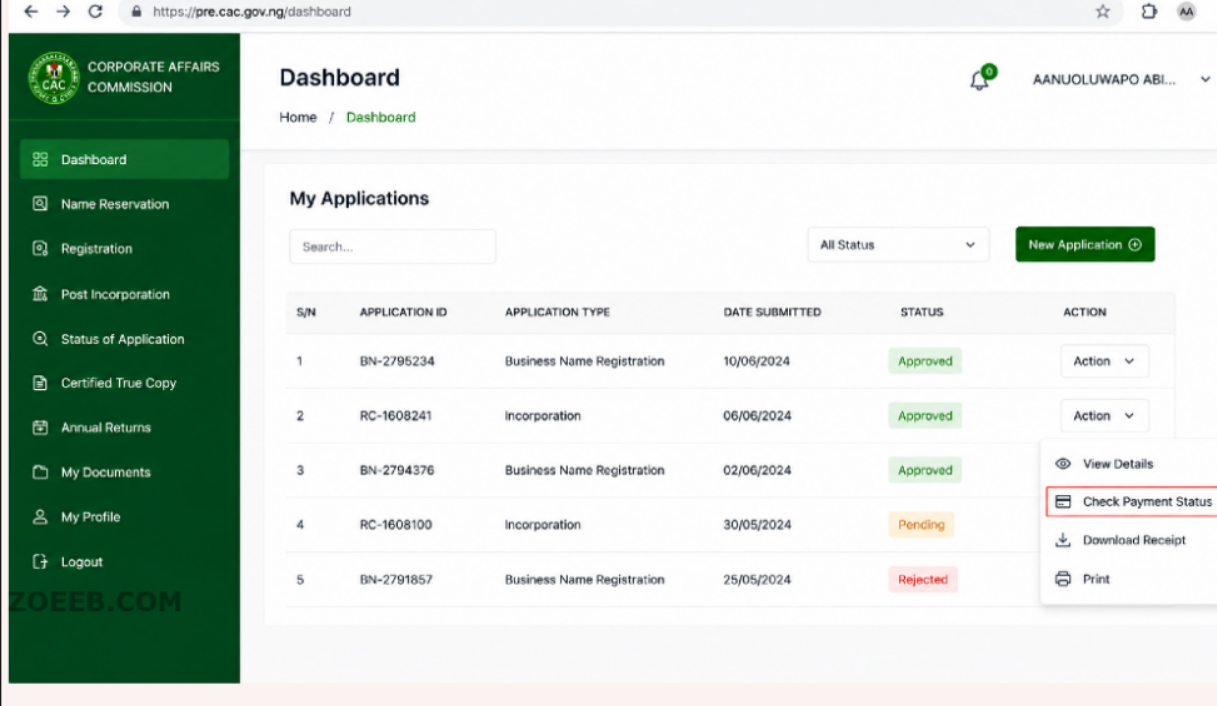
CAC specifically advises applicants whose bank accounts have been debited but whose payment is not showing on the portal to log in and use the “Check Payment Status” option against the application. For stamp duty, the portal may show “Check Status/Pay Stamp Duty.”
This is important because being debited by your bank does not necessarily mean the CAC application has already recognized the payment.
Quick Answer: How to Check CAC Payment Status
To check your CAC payment status:
- Go to the official CAC Company Registration Portal (CRP).
- Log in to your CAC account.
- Find the application for which you made payment.
- Look for the “Check Payment Status” option against the application.
- For stamp duty, use “Check Status/Pay Stamp Duty” where that option is displayed.
- Follow the result shown by the portal.
- If your account was debited but the payment is still not reflected, CAC advises that you contact its support channels or your bank.
Official CAC Company Registration Portal (CRP)
What Is the CAC Payment Status?
The payment status tells you whether a payment made for a CAC application has been recognised by the portal.
This is different from the application status.
For example, you may have:
- Made the payment successfully but the application has not moved forward.
- Been debited by your bank while CAC has not yet reflected the payment.
- An application that still requires payment.
- A payment that needs to be checked again through the portal.
The first thing to establish is whether CAC has recognised the payment.
How to Check CAC Payment Status Step by Step
1. Open the official CAC portal
Use the CAC Company Registration Portal rather than an unofficial website.
The current CAC portal identifies itself as the Official Company Registration Portal (CRP) of the Corporate Affairs Commission. It is used for managing company and business registration services.
What you should see: the CAC portal with options for account access and application-related services.
If the portal does not open: check your internet connection and try again. You can also try another browser.
2. Log in to your CAC account
Use the login details connected to the application.
CAC says that users can use their email address, phone number or accreditation number submitted when creating the account as a username. If you have forgotten your password, the portal provides a “Forgotten Password” option.
What you should see: your CAC account dashboard after a successful login.
If you receive an “Invalid Username or Password” message, check the credentials you entered. If necessary, use the password recovery option.
3. Find the application you paid for
Look through your applications on the dashboard and identify the application connected to the payment.
Make sure you are checking the correct application before attempting another payment.
This matters if you have more than one CAC application in your account.
4. Select “Check Payment Status”
CAC’s official FAQ specifically instructs applicants whose payment has not reflected to log in and click “Check Payment Status” against the relevant application.
This is the main step when checking whether CAC has recognised your payment.
What you should expect: the portal should check the payment associated with that application and provide the relevant payment status or action.
If you cannot see the option: check that you have opened the correct application. For stamp duty, CAC refers applicants to the “Check Status/Pay Stamp Duty” button where applicable.
5. Check whether the payment has been recognised
After checking the payment status, look at what the portal shows for that application.
Do not assume that a bank debit automatically means the CAC application has been updated.
If the payment is recognised, continue with whatever application action the portal makes available.
If your account was debited but CAC still does not recognise the payment, follow the troubleshooting steps below.
What If CAC Payment Is Not Reflected?
This is one of the most common payment problems.
You may see the money leave your bank account while the CAC application still appears to require payment.
CAC’s official FAQ directly addresses this situation. Its advice is to log in to the portal and use “Check Payment Status” against the application. If the payment still does not reflect, CAC says to contact its support email addresses or your bank.
If you have been debited but CAC has not updated the payment
Do the following:
- Log back into the CAC portal.
- Open the affected application.
- Select “Check Payment Status.”
- Check whether the payment has now been recognised.
- If it is still not reflected, keep your payment evidence.
- Contact CAC support and, where appropriate, your bank.
Do not immediately make another payment simply because the application still shows a payment option.
First establish what happened to the original transaction.
What If Payment Was Successful but the CAC Application Has Not Updated?
A successful payment and an updated application are related, but they are not necessarily the same thing.
If your bank confirms that the transaction succeeded, but the CAC application still looks unchanged, first use the portal’s “Check Payment Status” option.
If CAC still does not recognise the payment after checking, contact CAC support with evidence of the transaction. CAC specifically advises applicants in this situation to contact CAC or their bank.
Keep the following information available when reporting the problem:
- The CAC application details.
- The payment receipt or transaction evidence.
- Your payment reference, where available.
- The date of payment.
- The amount paid.
- Evidence that your bank account was debited.
Do not edit or create a different application just because the payment has not immediately appeared.
What If the CAC Payment Failed?
If the payment did not go through and your bank account was not debited, you should first confirm that the transaction actually failed before trying again.
If money was deducted, however, treat the situation differently.
Check the CAC portal first using “Check Payment Status.” CAC’s official guidance specifically covers cases where an applicant has been debited but the payment is not reflected.
Do not make a second payment too quickly
If you are unsure whether the first transaction succeeded, avoid paying again immediately.
A second payment could create another transaction when the first one may still be recoverable or awaiting recognition.
Check the original transaction and its status first.
What If You Paid Twice?
If you accidentally make duplicate payments, keep evidence of both transactions.
CAC’s refund policy requires an application for refund and evidence of payment. The Commission states that the Remita Retrieval Reference (RRR) should be attached, and where there are multiple payments in one transaction, all receipts should be attached.
CAC also states that where a refund is caused by the applicant’s fault, a 5% administrative charge applies.
Before requesting a refund, make sure you have confirmed the payment situation and gathered the relevant receipts.
What If You Paid the Wrong Amount?
Do not assume that you should simply pay another amount.
CAC advises customers to use the applicable fee schedule and requirements for the service they are applying for. The Commission also warns that paying the correct fees helps avoid delays in processing.
If you are unsure about the amount required, confirm the current fee on the official CAC website before making another payment.
CAC Payment Status vs Application Status
These two statuses should not be confused.
Payment status answers the question:
Has CAC recognized the payment connected to this application?
Application status concerns the progress of the application itself.
An application can therefore require you to resolve an issue even after payment has been recognised.
For example, CAC’s FAQ explains that when an application is queried, the applicant may need to resolve the query through the portal.
So if your payment is showing correctly but the application is still pending or queried, the problem may no longer be the payment.
What If Your Application Is Still Showing Pending?
If the payment has been made, first confirm that CAC has recognised it through “Check Payment Status.”
If the payment is recognised but the application remains pending, do not make another payment simply because the application has not changed.
CAC publishes separate service timelines for its services. Those timelines can depend on the service and, for some registrations, receipt of the relevant documents or compliance with a query.
The payment status should therefore be checked separately from the application’s processing status.
What If the Application Is Queried?
A query means CAC has raised an issue that needs to be addressed before the application can proceed.
If payment has already been recognised, paying again will not normally resolve the underlying query.
Check the application dashboard for the issue raised and follow the CAC instruction for resolving it.
CAC’s FAQ confirms that applicants can use the “resolve query” function where applicable.
What If You Cannot Log In to Check the Payment?
If you cannot access your account, CAC advises users experiencing login problems to check their credentials and use their email address, phone number or accreditation number as applicable.
For a “User not authorized” error, CAC also recommends checking the internet connection, trying another browser or clearing the browser cache. If the issue continues, CAC says users can lodge a complaint through its Support Center.
This is important because you cannot properly check a payment status until you can access the application.
What to Do If CAC Payment Status Still Does Not Update
If you have been debited and the payment remains unrecognised after using “Check Payment Status,” take these steps:
- Confirm that you are checking the correct application.
- Check the payment status again from the application.
- Keep your payment receipt and transaction evidence.
- Note the payment reference or RRR where available.
- Contact your bank if the transaction itself needs to be confirmed.
- Contact CAC support if the payment remains unreflected.
CAC’s official FAQ specifically directs applicants with this problem to contact CAC or their bank.
CAC Contact Details
CAC currently lists its contact number as +234-708-062-9000 and provides customer support through its official contact channels. Its website also provides a contact form for support.
What Information Should You Give CAC About a Payment Problem?
When contacting CAC about an unreflected payment, make your complaint easy to investigate.
Include:
- Your name.
- Email address connected to the CAC account.
- Application details.
- Date of payment.
- Amount paid.
- Payment reference or RRR, if available.
- Payment receipt.
- Evidence that your bank account was debited.
- A short explanation of what happened.
Avoid sending unnecessary sensitive banking information.
Should You Pay Again If CAC Has Not Reflected Your Payment?
Not immediately.
If you have already been debited, first use “Check Payment Status” on the CAC portal.
CAC specifically provides this option for payments that have not reflected even though the applicant’s bank account has been debited.
Only consider another payment after you have established what happened to the first transaction and confirmed what CAC requires.
Important: Confirm CAC Information Before Making Another Payment
CAC services and portal procedures can change.
Before making a new payment, confirm the current procedure, applicable fee and payment instructions directly on the official CAC website or Company Registration Portal.
Do not rely on an old screenshot, social media post or third-party article when money is involved.
Related CAC Searches
You may also want to read:
- How to check CAC application status
- How to download CAC certificate
- How to check CAC business name status
- CAC application showing queried: what to do
- CAC application showing pending: what to do
Frequently Asked Questions
How do I check my CAC payment status?
Log in to the official CAC Company Registration Portal, open the relevant application and select “Check Payment Status.” For stamp duty, CAC also refers to “Check Status/Pay Stamp Duty” where applicable.
I was debited but CAC says I have not paid. What should I do?
Use “Check Payment Status” on the application. If the payment is still not reflected, CAC advises you to contact CAC support or your bank.
Should I pay CAC again if my first payment is not showing?
Do not rush to make another payment. First check the original transaction through the CAC portal and confirm what happened to the first payment.
What should I do if I paid CAC twice?
Keep evidence of both payments. CAC’s refund policy requires evidence of payment, including the relevant Remita Retrieval Reference where applicable.
Does successful payment mean my CAC application is approved?
No. Payment recognition and application approval are separate matters. Your application may still need processing or may have a query that must be resolved.
How long does CAC take to process an application after payment?
CAC publishes service-specific processing timelines. These can depend on the type of application and, in some cases, receipt of relevant documents or compliance with a query. Check the current CAC service timeline for the particular service instead of assuming that payment guarantees a fixed processing time.
Important Point
If you have paid for a CAC application and your account was debited, the first step is not to pay again.
Log in to the official CAC Company Registration Portal and use “Check Payment Status” against the application. If the payment is still not reflected, keep your payment evidence and contact CAC or your bank, as advised by the Commission.
For fees, requirements and portal procedures, always confirm the latest information directly from CAC before making a new payment or submitting an application.
???? Stay Empowered with ZOEEB
Join our community for daily updates on jobs, skills, and financial growth opportunities.