
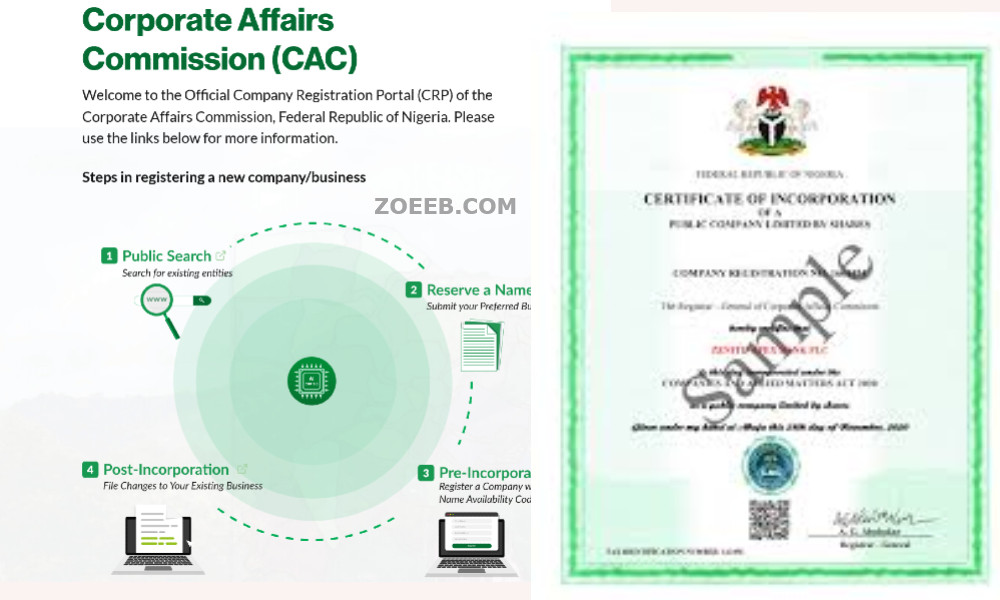
If your Corporate Affairs Commission (CAC) registration has been approved, you do not need to visit a CAC office to collect the certificate manually.
CAC now issues an electronic certificate through its Company Registration Portal (iCRP). According to CAC, once an entity’s registration is approved, the e-certificate is automatically generated and placed on the applicant’s dashboard for download.
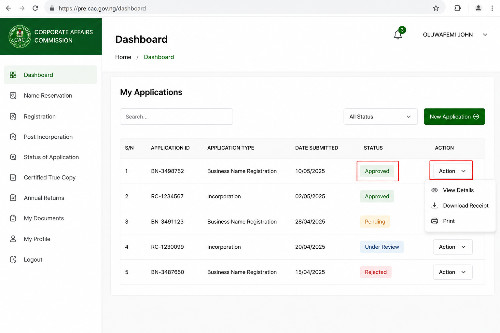
The important thing is to check the status of your application first. If it shows Approved, the certificate should be available through the application’s Action menu.
Quick Answer: How to Download CAC Certificate
To download your CAC certificate:
- Go to the official CAC Company Registration Portal.
- Log in to your CAC account.
- Open your dashboard and locate the relevant registration application.
- Check that the application status says Approved.
- Click Action beside the approved application.
- Select Download Certificate.
- Save the electronic certificate to your phone or computer.
CAC’s current iCRP guidance specifically states that an approved application has Download Certificate and Download Status Report options under the Action menu.
Official CAC portal: https://icrp.cac.gov.ng
Where Does the CAC Certificate Appear?
The certificate appears on your CAC portal dashboard after the registration has been approved.
CAC describes the certificate as an e-certificate. It is automatically generated after approval and made available on the dashboard for download.
You therefore do not need to search through your email for the actual certificate before checking your dashboard.
Your email may contain notifications about your application, but the official CAC guidance points applicants to the portal dashboard to access the certificate.
How to Download Your CAC Certificate
1. Open the official CAC portal
Go to the CAC’s official iCRP website:
The iCRP is CAC’s official Company Registration Portal. It is used for registration and related services involving companies, business names and other entities.
Avoid using links from unofficial websites when entering your CAC login details.
2. Log in to your CAC account
Click Login and enter the details associated with your account.
The current CAC login page allows users to log in using a username, email, phone number or accredited number, together with their password.
CAC also uses multi-factor authentication (MFA) on the iCRP. Depending on your account, you may be asked to complete the additional verification step before accessing your dashboard.
If you cannot remember your password, use the Forgot password option on the login page.
3. Open your application from the dashboard
After logging in, go to your dashboard and find the registration application for the business or company you want to download the certificate for.
You should be able to see the current status of the application.
This is the point where you need to pay attention to the status before looking for the certificate.
4. Check the application status
If the application shows Approved, CAC’s guidance says to click Action and then select Download Certificate.
You will also see an option to download the Status Report.
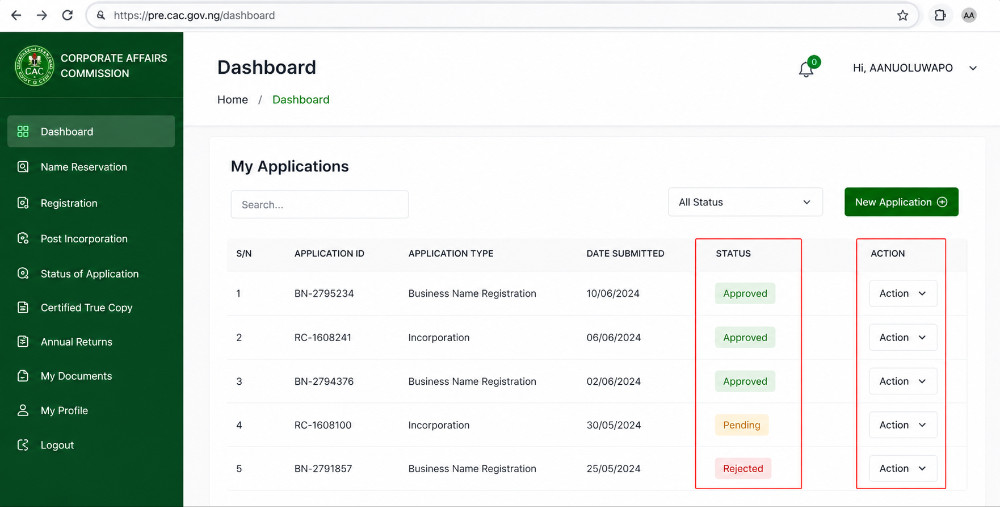
5. Click “Action” and select “Download Certificate”
For an approved application:
Action → Download Certificate
CAC’s official user guide specifically identifies this as the route for obtaining the incorporation documents after approval.
The certificate should open or download as an electronic document, depending on your device and browser settings.
Save a copy somewhere you can easily access later.
What the Different CAC Application Statuses Mean
Checking the status is important because the certificate is not available in the same way for every application status.
Approved
Approved means the application has been approved.
This is the status you should see before looking for the certificate. CAC’s current guidance says that when an application is approved, the applicant can use Action → Download Certificate and Action → Download Status Report.
If you see Approved but cannot find the certificate, use the troubleshooting steps below.
Pending
If the application shows Pending, CAC’s current iCRP guidance says the application is still under review. For the AI-reviewed processes covered by its guidance, CAC advises waiting a few moments and refreshing the dashboard.
Do not assume that a pending application means your registration has failed.
More importantly, you should not expect the certificate download option to be available before the application is approved.
Queried
A Queried application needs attention from the applicant.
CAC’s guidance instructs users to:
- Click Action.
- Select View Query History.
- Read the reason for the query.
- Select Modify Application.
- Make the required correction.
- Re-submit the application.
If your application is queried, focus on resolving the query first. The certificate download option is associated with an approved application.
What If Your CAC Certificate Is Not Showing?
If your application says Approved but you cannot see Download Certificate, do not immediately submit another registration application.
Try these steps first.
Refresh your dashboard
Log out and log back into the CAC portal, then check the application again.
If you are using a phone, you can also try accessing the portal from a computer or another browser.
These are practical troubleshooting steps rather than a CAC-prescribed fix.
Check the application status again
Make sure you are looking at the correct application.
The certificate is linked to the approved registration on the portal. CAC says the e-certificate is generated to the dashboard after approval.
Check the Action menu
Do not look only for a large download button on the dashboard.
According to CAC’s current guidance, the certificate is accessed through:
Application → Action → Download Certificate.
If the application is still Pending
You may need to wait for the application to move through the review process.
CAC publishes service timelines for different registration services. Its current published timeline lists 24 working hours for new company and business-name registrations, subject to receipt of relevant documents or compliance with a raised query.
However, this should not be treated as a promise that every individual application will be approved within exactly that period.
If the application is Queried
Open View Query History and check what CAC wants you to correct.
You should not keep trying to download a certificate from a queried application. Resolve the query and re-submit it as instructed by CAC.
What If Payment Has Been Made but the Application Has Not Updated?
If you have paid but the payment or application status has not updated, first check the application on your CAC dashboard.
Do not make another payment simply because the status has not changed unless the portal or CAC specifically instructs you to do so.
Keep your payment evidence and application details available if you need to contact CAC.
For portal-related problems, CAC’s official support page provides a complaint/help form. CAC also lists helpdesk@cac.gov.ng and cservice@cac.gov.ng for support, alongside its customer service number.
What If the CAC Certificate Contains Wrong Information?
If the certificate has incorrect information, do not edit the downloaded document yourself.
The information on the certificate comes from the registration record submitted through CAC.
If the information needs to be corrected, check the appropriate CAC correction or post-registration service rather than altering the certificate manually.
For sensitive corrections, confirm the applicable procedure directly with CAC before paying for another service.
What If You Cannot Log In to Your CAC Account?
If you have forgotten your password, CAC provides a Forgot password option on the iCRP login page.
If you no longer have access to the email connected to your account, CAC’s FAQ says you can contact helpdesk@cac.gov.ng or ict@cac.gov.ng with your account details to request an email update.
For security, do not send your password to anyone claiming to be able to recover your CAC account.
Is There a Fee to Download the CAC Certificate?
CAC’s current public information confirms that electronic certificates are generated through the registration portal after approval.
This article does not state a separate certificate-download fee because CAC’s current e-certificate guidance does not establish one as a general fee for simply downloading an already-generated certificate.
If the portal asks you to pay for a different service, read the service description carefully before making payment.
For current CAC fees, always check the Commission’s official fee information rather than relying on an old blog post or social media claim.
How Long Does It Take for the Certificate to Appear?
CAC states that the e-certificate is automatically generated to the dashboard once the registration is approved.
CAC also publishes service timelines for registration applications. For new registrations, its current published timeline is 24 working hours for companies and business names, subject to the conditions stated by the Commission.
If your application has already been approved but the certificate is not appearing, treat that as a portal/document-access issue and follow the troubleshooting steps above rather than submitting a new registration.
What to Do If You Still Cannot Download the Certificate
If your application is clearly marked Approved but the certificate is still unavailable, contact CAC through its official support channels.
Before contacting them, have the following information available:
- Your application details
- Registered business or company name
- Application or registration number, where available
- The email or phone number linked to the account
- Evidence of payment, if relevant
- A screenshot of the problem, if possible
CAC’s official iCRP support page provides a help form and lists 07080629000, helpdesk@cac.gov.ng and cservice@cac.gov.ng for customer support.
CAC Certificate vs Status Report
The two should not be confused.
The Certificate is the electronic registration certificate issued for the registered entity.
The Status Report is a separate document available from the approved application’s Action menu.
CAC’s current guidance lists both Download Certificate and Download Status Report for approved applications.
If someone specifically asks you for your CAC certificate, download the certificate rather than sending only the status report.
Important: Use the Official CAC Portal
There are many websites and individuals offering CAC-related services online.
For your own registration, use the official CAC portal:
CAC iCRP — Official Company Registration Portal
CAC itself identifies the iCRP as its official Company Registration Portal.
Before making any payment or submitting sensitive information, confirm the current fee, requirement and portal procedure on the official CAC website.
Related CAC Searches
These are useful related topics to link internally on Zoeeb:
- How to check CAC application status
- How to check CAC business name status
- CAC application showing queried: what to do
- CAC application showing pending: what to do
- How to correct CAC business name details
Frequently Asked Questions
Can I download my CAC certificate online?
Yes. CAC says its e-certificates are automatically generated to the dashboard after registration approval, where they can be downloaded.
Where can I find my CAC certificate?
Log in to the official iCRP and check the approved application on your dashboard. Under Action, CAC’s guidance provides a Download Certificate option.
My CAC application is approved but there is no download button. What should I do?
Refresh the dashboard, log in again and check the application’s Action menu. If the certificate is still unavailable, contact CAC support through its official help channels.
Can I download the certificate if my application is pending?
CAC’s current guidance associates the Download Certificate option with an Approved application. A pending application is still under review.
What should I do if my CAC application is queried?
Click Action → View Query History to see the reason for the query. Then use Modify Application to make the required changes and re-submit the application.
Is the electronic CAC certificate official?
Yes. CAC has adopted electronic certificates and states that the e-certificate is generated through its portal after approval.
CAC portal procedures, fees and requirements can change. Before making any payment or submitting sensitive information, confirm the latest details on the official Corporate Affairs Commission website and iCRP.
???? Stay Empowered with ZOEEB
Join our community for daily updates on jobs, skills, and financial growth opportunities.