
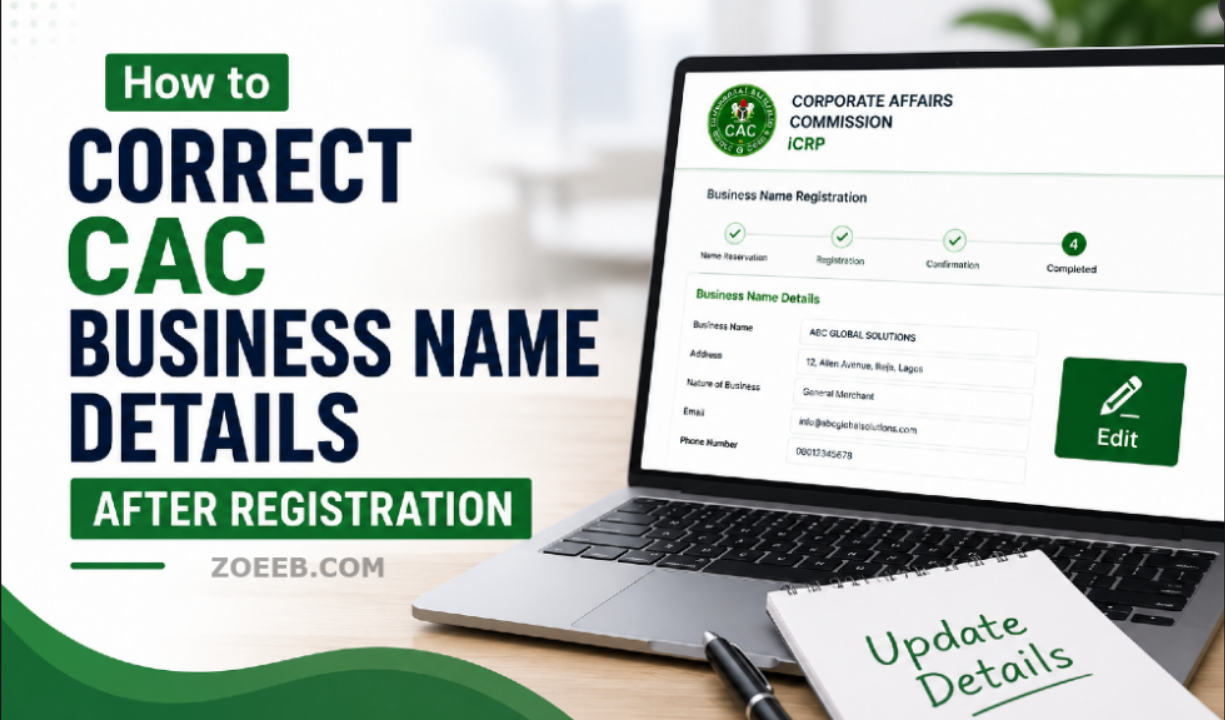
If you have already registered a business with the Corporate Affairs Commission (CAC) and later discovered that some of the information is wrong, you may be able to correct it through a post-registration filing.
The exact process depends on what is incorrect. A mistake in the proprietor’s name, date of birth, address, phone number or email is handled differently from changing the registered business name itself.
This guide explains where to start on the current CAC portal, the relevant post-registration service, the documents CAC lists for corrections, fees, processing time and what to do when the application is queried or payment does not reflect.
Quick Answer: How to Correct CAC Business Name Details
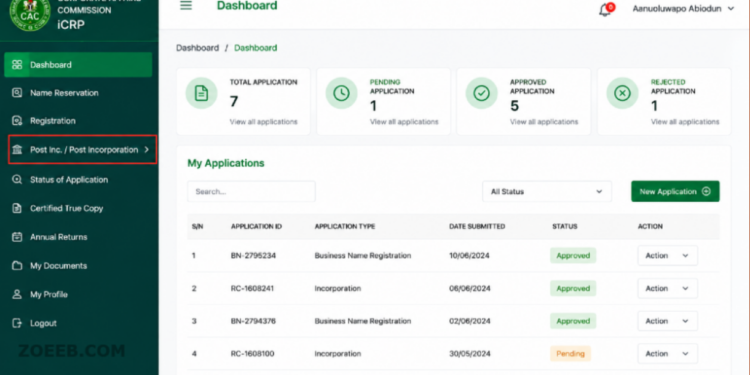
Log in to the official CAC iCRP and use the Post Incorporation/Post Inc. section to search for your registered business and start the appropriate post-registration filing.
For a correction involving the proprietor or partner’s details, CAC’s official checklist identifies Form CAC/BN 05 – Notice of Change/Correction in Particulars of Proprietor/Partner as the relevant service.
This covers information such as the proprietor’s name, date of birth, email, telephone number, occupation, signature, gender and residential address.
If the business name itself is what you want to change, CAC lists Notice of Change of Name (CAC/BN 03) as a separate post-registration service.
Read Also : How to Download CAC Certificate After Registration Approval
Which CAC Details Can Be Corrected?
It is important to identify the exact mistake before starting the application.
CAC’s official CAC/BN 05 form provides for correction or change of the following proprietor or partner information:
- Email address
- Telephone number
- Occupation
- Signature
- Gender
- Proprietor’s or partner’s name
- Date of birth
- Residential address
The form also asks for the business name and registration number, so you should have your CAC registration information available before starting.
What if the business name itself is wrong?
A correction to the proprietor’s information is not the same as changing the registered business name.
CAC separately lists CAC/BN 03 – Notice of Change of Name for a business name change. Therefore, do not select the proprietor correction service simply because the error appears somewhere on your CAC certificate.
If the actual registered business name is incorrect, check the available post-registration service on your CAC account and select the service that corresponds to a business name change.
Official CAC Portal for Correcting Business Details
The process starts from the official CAC iCRP, the Corporate Affairs Commission’s current Company Registration Portal.
Open the official CAC iCRP portal
CAC says the new iCRP allows users to manage registered businesses and companies, while its FAQ explains that post-incorporation filings can now be accessed through the main portal rather than a separate Post-Incorporation login.
The current CAC instructions say to:
- Log in to your CAC account.
- From the dashboard, click Post Inc. or Post Incorporation.
- You will be redirected to the Post landing page.
- Search for the registered entity.
- Select the business to open its entity dashboard.
- Proceed with the appropriate post-registration filing.
How to Correct CAC Business Name Details Step by Step
Step 1: Log in to your CAC account
Open the official iCRP and sign in using your CAC account credentials.
The current CAC login system accepts a username, email address, phone number or accreditation number. CAC also uses two-factor authentication for account access.
If you cannot log in, do not create another application immediately. First use the password recovery option or follow CAC’s account recovery instructions.
Step 2: Open Post Incorporation
Once you reach your dashboard, look for Post Inc. or Post Incorporation.
CAC’s current FAQ confirms that this is where post-registration filings are initiated on the new iCRP.
Select the option to continue.
What you should expect: You should be taken to the Post landing page where you can search for the registered entity.
If you cannot see the Post option, first confirm that you are logged into the correct CAC account. If the option is still unavailable, contact CAC support rather than using an unofficial website.
Step 3: Search for your registered business
Use the Post section to search for the business you want to correct.
Select the correct business and proceed to its entity dashboard.
Make sure the registration number and business name correspond to the business you actually want to update.
Step 4: Select the appropriate post-registration service
This is the most important part.
If the error concerns the proprietor or partner’s details, CAC identifies CAC/BN 05 – Notice of Change/Correction in Particulars of Proprietor/Partner for this purpose.
If you want to change the business name itself, CAC lists CAC/BN 03 – Notice of Change of Name as a separate service.
CAC also lists other business-name post-registration services, including:
- Change in principal place of business or branch address – CAC/BN 02
- Change of business name – CAC/BN 03
- Change in objects – CAC/BN 04
- Change/correction in particulars of proprietor or partner – CAC/BN 05
- Removal/addition of partners – CAC/BN 5A
- Annual return – CAC/BN 06
- Certified extracts
- Cessation of business name – CAC/BN 7
Do not choose a different service simply because it looks similar. The service should match the information you want to change.
Step 5: Enter the corrected information
Complete the relevant application with the correct information.
For a CAC/BN 05 correction, CAC’s official form provides fields for the affected proprietor or partner and the information being changed or corrected.
Check every detail before submission.
This is particularly important for:
- Spelling of names
- Date of birth
- Phone number
- Email address
- Residential address
- Gender
- Occupation
Where the portal gives you a preview before submission, carefully check it before proceeding.
Step 6: Upload supporting documents where required
The documents required depend on the type of correction.
For change/correction in particulars of a proprietor or partner, CAC’s official checklist lists:
- Supporting documents
- Evidence of the change of information
- Affidavit of facts, where applicable
- A recognised and valid means of photo identification
CAC lists acceptable identification examples as a National Identification Card, international passport data page, driver’s licence or voter’s card.
For a change of nationality resulting from naturalisation, CAC also states that a copy of the certificate of naturalisation should be attached.
Important: Do not upload documents simply because you have them. Use the documents relevant to the correction you are making and follow the document requirements displayed by CAC for your particular application.
Step 7: Review and submit the application
Before submitting, check the corrected information against your supporting documents.
A small spelling error in the correction application can create another problem.
Once you are satisfied that the information is correct, submit the application and complete any payment requested by the portal.
Keep your payment reference and application details.
Read Also: How to Check CAC Application Status in Nigeria: Pending, Queried or Approved
How Much Does CAC Charge to Correct Business Details?
CAC requires filing fees for its services, but the amount can depend on the specific post-registration service.
For that reason, this article does not state a fixed amount for correcting business details.
CAC’s official business-name service directs applicants to its current fee information when making payments.
The safest approach is to check the amount displayed by the official CAC portal for the exact service you select before making payment.
Do not rely on an old blog post or a social-media post quoting a CAC fee because the Commission’s charges can be revised.
How Long Does CAC Take to Process the Correction?
CAC currently lists 48 working hours for all post-registration applications for Business Names, subject to receipt of the application or physical submission by courier, or compliance with an issued query.
This should be treated as CAC’s published service timeline, not a guarantee that every application will be completed within exactly 48 working hours.
A queried application can take longer because the applicant may need to correct information or provide additional documentation.
CAC states that post-registration filings are manually reviewed by approving officers.
What Happens After You Submit?
After submission, the application goes through CAC’s post-registration review process.
CAC’s current iCRP FAQ says post-incorporation applications are manually reviewed by approving officers after submission.
Depending on the application, you may need to respond to a query or provide additional information.
If CAC raises a query, read the query carefully and make the requested correction before resubmitting.
Do not submit a completely new application just because the first application has been queried unless CAC’s instructions require it.
Common Problems When Correcting CAC Business Details
1. The application is still pending
A pending application means you should first allow the application to go through the review process.
CAC’s published timeline for business-name post-registration applications is 48 working hours.
If the application has gone beyond the published timeline without an update, contact CAC support with your application details.
2. The application is queried
A query means CAC needs something addressed before the application can proceed.
Log into the portal and check the application for the query or instruction issued by CAC.
Provide the requested information or document and resubmit where the portal allows you to do so.
3. Payment has been made but is not showing
CAC’s FAQ specifically addresses payments that do not reflect even though the applicant has been debited.
CAC advises users to log in and use the Check Payment Status or Check Status/Pay Stamp Duty option against the application. If the payment still does not reflect, CAC says to contact its support email addresses or the bank.
Keep your payment evidence and bank debit information because CAC may need the transaction details to investigate the problem.
4. The wrong information is still showing
First check whether the correction application has actually been approved.
Do not assume that submitting an application automatically changes the information on the CAC record.
If the application has been completed but the information is still incorrect, contact CAC and provide the registration number, application details and evidence of the approved correction.
5. You cannot find the Post Incorporation option
CAC’s current instructions place post-registration services under Post Inc./Post Incorporation on the iCRP dashboard.
If the option does not appear, check that you are using the official iCRP account associated with the business and that you have logged in successfully.
If the problem continues, contact CAC support rather than paying an agent to use an unofficial portal.
6. You cannot log in
CAC says users can log in with their username, email address, phone number or accreditation number.
If you have forgotten your password, use the Forgot Password option.
For problems with account access, CAC’s current support information provides helpdesk contacts.
What to Do If the CAC Correction Does Not Work
If you have followed the official process and the issue is still unresolved:
- Check the application status and any query attached to it.
- Confirm that your payment was successfully recorded.
- Check that the documents you uploaded match the correction being requested.
- Keep your application reference and payment evidence.
- Contact CAC through its official support channels if the problem continues.
CAC’s current iCRP contact page lists helpdesk@cac.gov.ng and cservice@cac.gov.ng, as well as the customer service number 07080629000.
Avoid paying people who claim they can “correct” your CAC details through a private portal. If you use an accredited agent, make sure you understand the service being filed and the official CAC fee separately from any agent’s professional charge.
Important Difference: Correction vs Change
This is where many applicants make mistakes.
A correction is generally used when information on the CAC record needs to be corrected or updated, such as an incorrect proprietor’s name, date of birth, phone number or address.
A change of business name is a different post-registration service.
CAC’s official checklist treats these as separate filings, with CAC/BN 05 covering correction/change in proprietor or partner particulars and CAC/BN 03 covering change of business name.
So, identify the exact information that is wrong before starting the application.
Final Advice Before You Pay or Submit
CAC’s portal and procedures can change as the Commission updates its digital registration system.
Before making payment or submitting a correction, check the information displayed on the official CAC iCRP and CAC website for the current service, requirements and fee.
The official CAC portal is:
CAC iCRP – Official Company Registration Portal
The CAC website also provides its current services, resources, FAQs and contact information.
Frequently Asked Questions
Can I correct my CAC business details after registration?
Yes. CAC provides post-registration services for business names, including correction or change of proprietor or partner particulars.
What CAC form is used to correct proprietor details?
CAC lists CAC/BN 05 – Notice of Change/Correction in Particulars of Proprietor/Partner for this purpose.
Can I change the registered business name after registration?
CAC lists CAC/BN 03 – Notice of Change of Name as a post-registration service for business names.
What documents do I need to correct proprietor information?
CAC’s checklist lists supporting documents, evidence of the change, an affidavit of facts where applicable and a recognised valid means of photo identification. The exact supporting evidence depends on the correction being requested.
How long does CAC take to process a business-name correction?
CAC currently lists 48 working hours for business-name post-registration applications, subject to the conditions stated in its service timeline.
What if my CAC payment is not showing?
Use the payment-status option against the application. If the payment still does not reflect after you have been debited, CAC advises contacting its support channels or your bank.
???? Stay Empowered with ZOEEB
Join our community for daily updates on jobs, skills, and financial growth opportunities.