
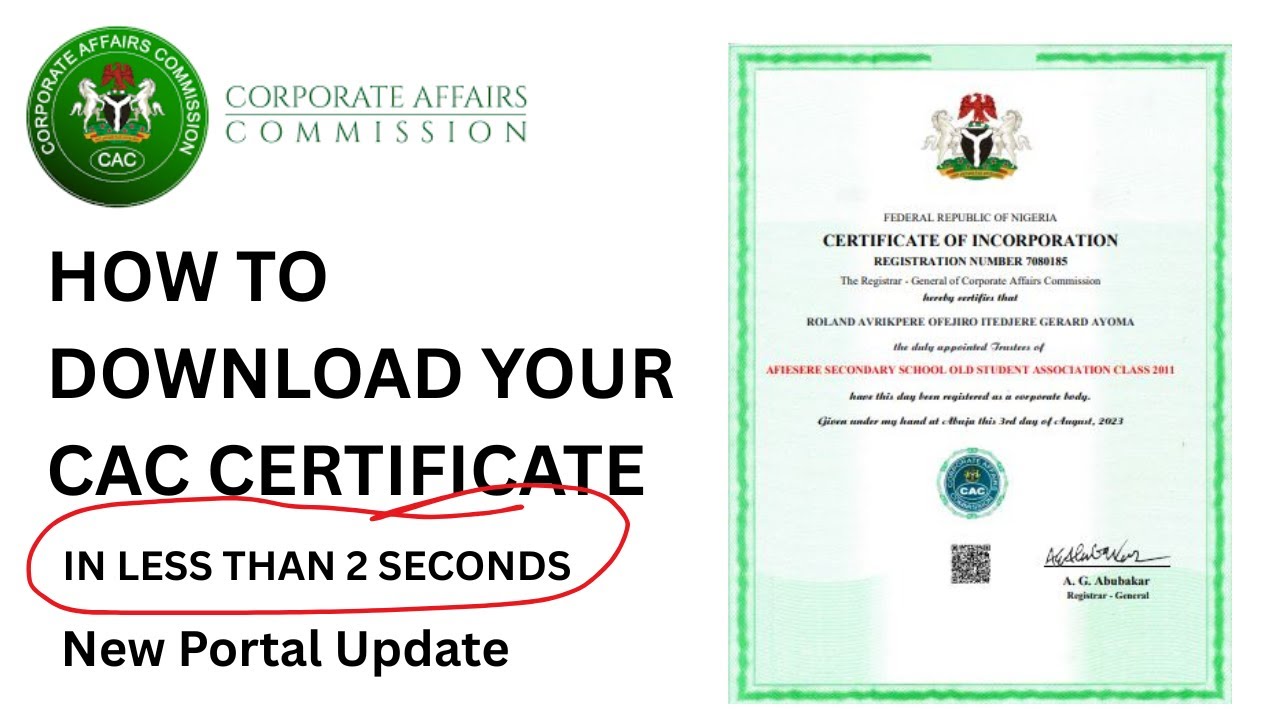
If you registered a business or company with the Corporate Affairs Commission (CAC) and can no longer find your certificate, you may be able to access the electronic certificate through your CAC portal account.
CAC says its current Company Registration Portal (CRP) uses electronic certificates. Once an entity is approved, the certificate is automatically generated on the applicant’s dashboard and can be downloaded.
However, older registrations can be different. If the registration was completed under an earlier system, the certificate may not simply appear in a newer portal account. In that situation, you may need to confirm the registration first and, where necessary, apply for a certified copy of the certificate.
Quick answer: How do I retrieve my CAC certificate online?
Start with the official CAC Company Registration Portal and sign in to the account associated with the registration.
If the application was approved on the current system, CAC says you can go to the approved application on your dashboard and download the electronic certificate.
If you cannot find the registration, especially if it is an older CAC registration, do not create a new registration just because the certificate is missing. First use CAC’s Public Search to confirm that the entity exists and obtain the relevant registration information.
If the original certificate cannot be accessed, CAC also provides a process for obtaining a Certified True Copy (CTC) of a certificate. CAC’s published service information lists CTC of certificates as a post-registration service.
Official CAC portal for retrieving your certificate
The official portal to start with is the CAC Company Registration Portal (CRP):
Official CAC Company Registration Portal
CAC describes iCRP as its official Company Registration Portal. The portal is used for company and business registration and related corporate services.
You can also use the CAC Public Search when you need to confirm an existing registration:
The Public Search allows users to search existing companies and businesses using information such as the entity name, RC number or AV code.
[Screenshot suggestion: Add a screenshot of the official CAC iCRP homepage showing the login/account area.]
How to retrieve a CAC certificate from your dashboard
If the registration was completed on the current CAC system, follow these steps.
1. Open the official CAC iCRP
Go to the official CAC Company Registration Portal.
Do not use links from random websites or social media pages when entering your CAC login details.
2. Log in to your CAC account
Enter your account details and sign in.
CAC’s FAQ says users can log in using their username, email, phone number or accreditation number, together with their password. The new system may also require two-factor authentication (2FA).
If you cannot remember your password, use the Forgot Password option on the login page. CAC says a password reset link will be sent to the registered email address.
3. Check your dashboard for the registration
After logging in, look for the relevant registration or application on your dashboard.
This is particularly important if you have used the CAC portal for more than one registration.
Do not assume that a missing certificate means the registration was cancelled or does not exist.
4. Open the approved application
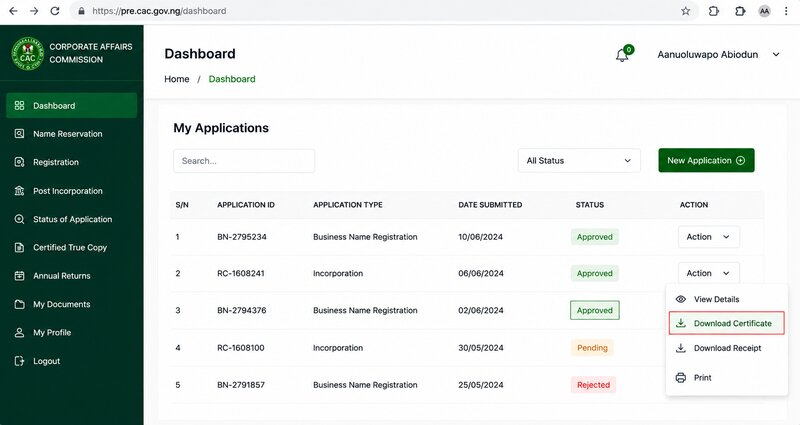
If the application is approved, CAC’s current user guide says the dashboard provides options to Download Certificate and Download Status Report.
The CAC guide specifically describes the process as:
Dashboard → Action → Download Certificate.
The electronic certificate should then be available for download.
[Screenshot suggestion: Add a screenshot showing the “Approved” application and the “Download Certificate” option. Use an actual CAC portal screenshot rather than a recreated image.]
What if the certificate is not showing on the dashboard?
This is where many CAC users get stuck.
If you cannot see the certificate, first determine whether the registration itself is showing.
There is a major difference between:
- The registration is on your dashboard but the certificate cannot be downloaded.
- The registration is not on your dashboard at all.
- You cannot access the CAC account.
- The registration is an older one completed under a previous system.
The solution can be different in each case.
If the registration is on your dashboard but the certificate is missing
Check the application status first.
CAC’s current process identifies an approved application as one where the certificate and status report can be downloaded.
If the application says Approved but the download option does not work:
- Refresh the dashboard.
- Sign out and log in again.
- Try accessing the portal from another browser.
- Check whether the certificate opens in a new browser tab or downloads automatically.
- Make sure your internet connection is stable.
- If the option is still unavailable, contact CAC support rather than submitting a new registration.
These browser and connection checks are practical troubleshooting steps. They are not CAC processing requirements.
If you cannot remember the email or login details
Losing access to the email used for CAC registration is a common reason people cannot retrieve old documents.
CAC’s FAQ provides a specific option for checking the email associated with an account. It also says that users who no longer have access to the email can send a request to helpdesk@cac.gov.ng or ict@cac.gov.ng with their account details to request an email update.
If you still have access to the account:
- Go to the CAC login page.
- Use the Check Email option if you are unsure which email is linked.
- If you forgot your password, use Forgot Password.
- Follow the password reset instructions sent to the registered email.
If you no longer have access to the registered email, follow CAC’s stated support route rather than creating another account and assuming the old registration will automatically appear there.
How to retrieve an older CAC registration
This is slightly different from downloading a recently issued electronic certificate.
If your business or company was registered years ago and you no longer have the certificate, start by confirming that the registration is still in the CAC records.
Step 1: Search the CAC Public Search
Open the official CAC Public Search: CAC Public Search
Search using the information you have.
CAC’s search page provides fields for an entity name, RC number or AV code.
If you know the RC number, use it. This is usually more precise than searching only by the business name.
Step 2: Confirm the registration details
Check whether the search result corresponds to your business or company.
Pay attention to the registered name and registration number.
If the entity appears in the CAC records, that is useful confirmation that you are dealing with an existing CAC record rather than trying to recover a registration that cannot be found.
Step 3: Do not register the business again
If an older registration appears in CAC’s Public Search but the certificate is not available in your current dashboard, do not immediately start a fresh registration.
You already have a registration record.
The problem is accessing or obtaining the document associated with that record.
Step 4: Contact CAC or request the appropriate certified copy
CAC has a service for Certified True Copy (CTC) of Certificates. Its current service-timeline page lists this as a post-registration service with a stated timeline of 12 working hours, subject to the conditions stated by CAC for the service.
CAC also publishes a form specifically titled Application for Certified True Copy of Certificate (CAC/CTC-001). The form asks for information including the registration number and entity name and provides instructions concerning supporting documents, payment evidence and delivery.
Because CAC has changed its online systems over time, users with older registrations should confirm the current application method and applicable requirements with CAC before paying for a CTC.
What is a Certified True Copy of a CAC certificate?
A Certified True Copy (CTC) is an official certified copy of a document held by the Commission.
This is different from simply downloading an electronic certificate that is already available on your dashboard.
For someone who has lost an older certificate, the CTC route may therefore be relevant where the original document cannot be retrieved through the current portal.
CAC’s published service timelines specifically include Certified True Copy (CTC) of Certificates as a post-registration service.
What if your CAC application says Pending?
If you are trying to retrieve a certificate from an application that has not yet been approved, there may be no certificate available to download yet.
CAC’s current user guide says that when an application is Pending, the system is still reviewing it and the applicant should wait briefly and refresh the dashboard.
If it remains pending for longer than expected, check the application again and use CAC’s support channels if the issue persists.
Do not treat a pending application as a lost certificate.
What if your CAC application says Queried?
A Queried application means CAC has raised an issue that requires attention before the application can proceed.
CAC’s guide instructs applicants to:
- Click Action.
- Select View Query History.
- Check the reason for the query.
- Select Modify Application.
- Correct the relevant information.
- Re-submit the application.
A queried application should therefore not be treated as an approved registration with a missing certificate.
What if you have the wrong business information?
If the CAC record contains incorrect information, do not create another business registration simply to correct it.
The appropriate solution depends on what information is wrong and the type of post-registration service required.
CAC provides post-registration services through its CRP, including services relating to changes to company information.
If you are unsure which post-registration process applies, check the relevant CAC service or contact the Commission before making a payment.
What if you cannot log in to CAC?
Try the following:
Forgotten password
Use Forgot Password on the CAC login page. CAC says this sends instructions for resetting the password to the registered email.
Forgotten email
CAC’s FAQ says the login page has a Check Email option that can help you identify the email linked to the account.
No access to the registered email
CAC says users can send a request to helpdesk@cac.gov.ng or ict@cac.gov.ng with their account details to request an email update.
Duplicate username or phone number
CAC’s FAQ explains that the new system may require users to update a duplicate username or phone number before logging in.
What if the CAC portal keeps showing an error?
First, establish whether the problem is with your account or the CAC portal.
Try:
- Refreshing the page.
- Logging out and back in.
- Using another browser.
- Clearing the browser cache.
- Trying again with a stable internet connection.
- Checking whether CAC has provided a service or portal notice.
- Keeping your registration number and account details available if you need to contact CAC.
Do not make another payment simply because the page failed to load.
If money has already been deducted, keep your payment receipt or transaction reference before attempting anything else.
What if the certificate still cannot be retrieved?
If you have confirmed that the registration exists but the certificate cannot be accessed, gather the information CAC is likely to need to identify the record.
Keep available:
- Business or company name
- RC number, if available
- Previous CAC registration details
- Email previously used for the account
- Payment or transaction information, where relevant
- Screenshots of the portal error, if applicable
Then contact CAC through its official support channels.
The Commission’s current website lists helpdesk@cac.gov.ng and cservice@cac.gov.ng among its contact emails, alongside its official telephone contact.
For an older registration, clearly explain that you are trying to retrieve an existing certificate, rather than register a new entity.
CAC certificate retrieval fees
There is no single fee that should be quoted for every certificate-retrieval situation.
If your electronic certificate has already been generated and is available on your CAC dashboard, downloading it is part of the current electronic registration process. CAC says approved registrations have the certificate automatically generated on the dashboard.
However, obtaining a Certified True Copy is a separate service.
CAC’s published fee information and service requirements can change, so users should check the current official CAC fee schedule for the exact service before making payment.
Do not rely on a fee quoted by an agent, social media post or old blog without checking CAC’s current information.
How long does CAC certificate retrieval take?
For current electronic certificates that are already generated on the dashboard, there is no separate certificate-production period stated by CAC in the e-certificate explanation. CAC says the certificate is automatically generated after approval and made available on the dashboard for download.
For a Certified True Copy of a Certificate, CAC’s current service-timeline page lists 12 working hours for CTC of certificates.
Actual handling can still depend on the type of request and whether CAC requires additional information or compliance.
Important things to check before paying anyone
If somebody offers to “retrieve” your CAC certificate for a fee, first check whether you can access it yourself through the official CAC portal.
Also confirm:
- The business or company name.
- The RC number.
- Whether the entity appears on CAC Public Search.
- Whether your old registration is linked to your portal account.
- Whether you actually need a CTC.
- The current CAC fee for the service.
- The official payment channel.
Never send your CAC portal password or 2FA code to an agent simply because you cannot find your certificate.
Related CAC searches guide
- How to check CAC registration status online
- How to download CAC status report
- How to check CAC payment status
- How to correct information on a CAC certificate
Frequently Asked Questions
Can I download my CAC certificate online?
Yes, where the registration has been approved on CAC’s current system, CAC says the electronic certificate is automatically generated on the dashboard and can be downloaded.
Why can’t I see my old CAC certificate on the new portal?
Older registrations may not appear in the same way as registrations completed on the current system. First confirm the entity through CAC Public Search. If the registration exists but the certificate cannot be accessed, contact CAC or use the applicable CTC process.
Can I retrieve a CAC certificate without the RC number?
You can use CAC Public Search to search existing entities by entity name, RC number or AV code. However, having the correct registration details will make it easier to identify the right record.
What should I do if I forgot the email used for CAC registration?
CAC says you can use the Check Email option on the login page. If you no longer have access to the registered email, CAC advises users to contact helpdesk@cac.gov.ng or ict@cac.gov.ng with their account details.
What if my application is approved but there is no download button?
Refresh the dashboard and log in again. If the certificate still does not appear, contact CAC support with the registration details and evidence of the problem. Do not submit a duplicate registration.
What is the difference between downloading a CAC certificate and getting a CTC?
Downloading the certificate means accessing the electronic certificate already generated for an approved registration on the portal. A CTC is a certified copy requested through CAC’s document-copy service. CAC lists CTC of certificates as a post-registration service.
CAC portal procedures, fees and requirements can change. Before making any payment or submitting a request, confirm the current information on the official Corporate Affairs Commission website and portal. The official CAC portal is the appropriate source for your specific registration record and current service requirements.
???? Stay Empowered with ZOEEB
Join our community for daily updates on jobs, skills, and financial growth opportunities.